Time for some more “weekly” learnings! Although it has been 19 days. This week I have been looking to discover how people get towards “Level 4” in Boris Cherny’s steps of AI adoption.
I scrolled through YouTube for the first video that seemed like they were showing me their setup rather than trying to teach me a course. I found this video by Tonbi’s AI Garage, and they showed a flow where it went hunting for product feedback and bugs, ranked and deduped them, created tickets on a Kanban board, got human approval via a messaging app and then if approved went ahead and implemented them. This sounded like the level of sophistication and automation I am craving.
The basic secret here is just “use Hermes”. What I mean is that Hermes (an AI agent, somewhat like OpenClaw) has all the tooling built in for what was done in the video which is really cool. Tonbi has done a lot of work to set up that flow on top of what Hermes provides, however it was well within the spirit of how Hermes operates.
For my experiment I wanted to something 10x simpler that to get oriented. I put some money in OpenRouter as you can’t use a Claude subscription with this tool. I picked deepseek-v4-flash as the model, mainly because it was cheap so my $20 would go far (and didn’t mind it being a bit crappy).
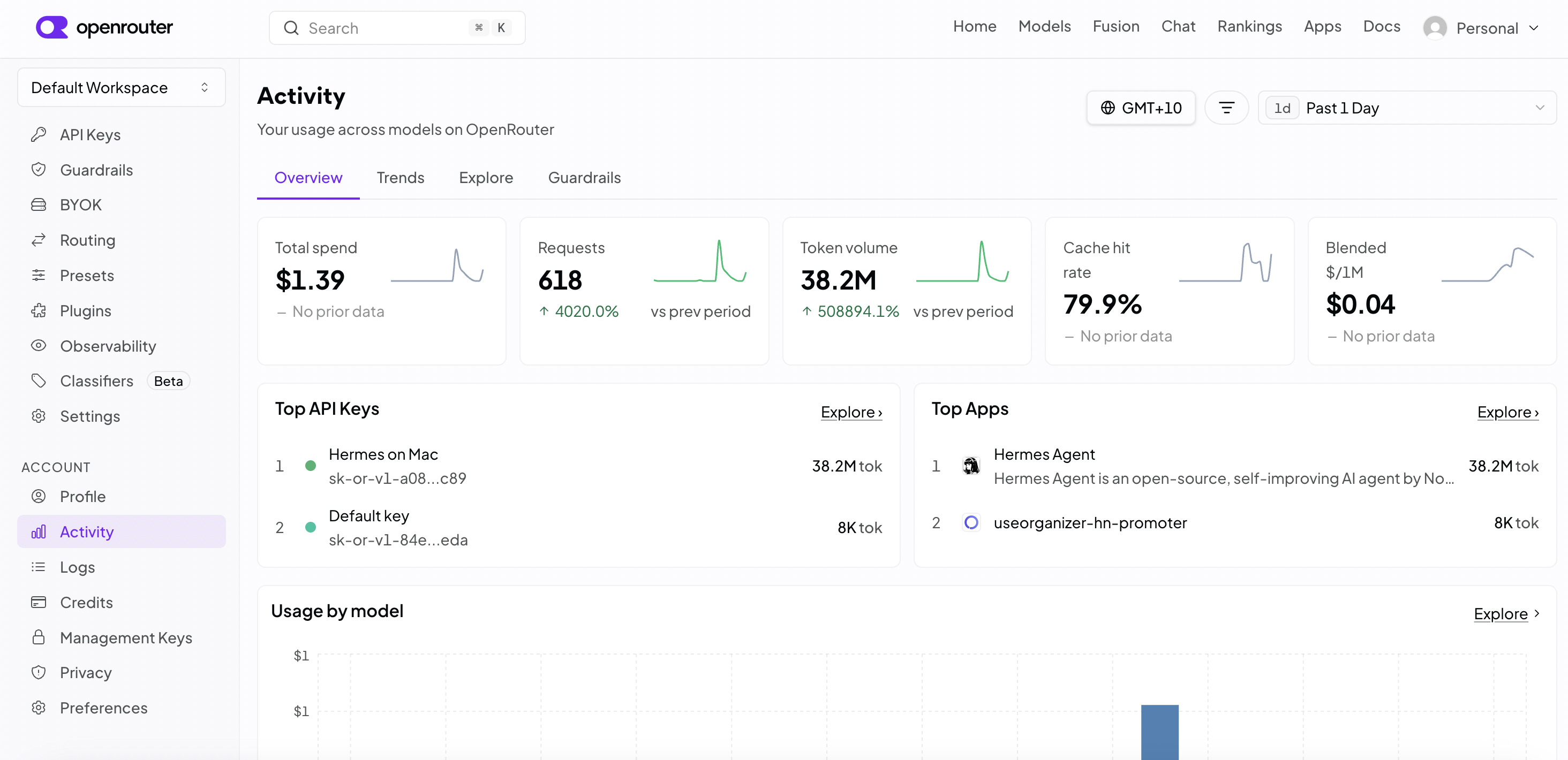
That said I found that the model is pretty decent and honestly for simple coding it doesn’t seem much different to using Claude Code. I did a decent amount of play today for just US$1.39:
What I like about Hermes is it is very easy to install, and intuitive to use. I recommend the setup with options rather than automated. I chose mostly defaults anyway, but with OpenRouter and the model I mentioned before, and I added Signal integration, so I can chat to it from my phone.
For my main chat interactions and configuration, I opted for the web interface, which if you launch like this you can then connect a Cloudflare tunnel to access it from another computer, do these 2 commands in 2 separate terminals. The first one will ask you to set up auth of some sort e.g., username/password.
hermes dashboard --host 0.0.0.0
cloudflared tunnel --url http://0.0.0.0:9119
This gives me 2 ways to interact, the web-UI and signal chat. I found it cool at first to use signal, really cool. Chatting to an app and things getting done on a computer in the other room. However once the initial novelty wore off, there were problems.
It only has one agent chat on the other end, so if it polls for updates for another task, it becomes unresponsive. This could probably be fixed somehow though, please comment if you have suggestions. In the web-UI this is not an issue you can start another chat.
I created a task to add Personal Web App PWA support for my open source project http://useorganizer.com/. PWA is like a webpage you can install to your phone as a homepage app. It did a great job of that. The only odd thing is it decided to just make code changes and not commit, so I edited the SOUL.md file of the coding profile.
What does all this mean? SOUL.md is just instructions for a profile, and a profile lets you have agents with different skills and instructions for different jobs. By having a coding profile I could then create a Kanban ticket for the job, and then the system picks this up and does the work and moves it to done when done.
I just wanted to get a basic feel for this with one task, but in theory you can have dozens of tasks flowing through this. You can have child and parent dependencies and the scheduler will figure out what can be done next. This would seem to allow a lot of opportunity for tuning your flow and steps, and that is what was done in the video above.
My next step was to make it easier to get a task up. I don’t want to use the UI, I want to have a chat about requirements to the agent and then have it create the task, so I set up a profile, with this soul.md. I spent about 20 seconds on this:
{default SOUL.md stuff...}

You will help the user create a Kanban task that has sufficient information to be successful. The process is to ask them what they want, ask follow-up questions to get full picture, then once ready create the Kanban task assigned to a profile ready to pick up.

use the plan skill
I used this new profile with a new chat session to create a task to change how data is stored in the organizer. For this task I want storage to be simpler and work better on Android without keeping asking for permissions. I wanted to achieve this by using It asked a bunch of clarification question as I expected it to, for example how to handle data migration, what to do on Firefox and so on. Here was my prompt:
I want to change how the storage is done on this app, so that we use the system where the app gets allocated a folder (not sure the technical name) rather than picking a folder, so that on android we don't need to keep repicking each time we use the app. I also want to explore if we need to keep local storage support of if that folder option alone is enough which gives simplicity (no choice to make)This is something before I would have done in Claude Code and babysat it, but now I am writing this post as that runs, which is closer to what I want to get to, i.e., agents doing stuff while I do other stuff, or set up more agents.
I’m glad I used Hermes and tried it out. People debate if it should be used for coding. I think it absolutely can be. It uses git worktrees, so it is fine: if required I can just jump into the folder and launch VSCode. I’ll be using it for coding as my main driver for now, and see if I can change my perspective of the level I work at, stepping back from turn-based coding to something closer to orchestration of agents.
Image by Susann Mielke from Pixabay