This is a series where I talk about trying to learn more about AI tools, with the goal of learning practical skills to solve problems both in life and at work.
Current State
I know basically how LLMs work e.g., by doing the zero-hero course a while back, and I use AI almost exclusively for writing code at work using Rovo, and now looking at how do I effectively “harness” things to get the best results, waste less time, avoid tech debt and so on.
I am also interested in automated agents and how they can be useful, how to avoid slop from whatever source wasting human time, and when—like I am now for writing this post—not to use AI at all.
This week
This week I started with Building effective agents, which is a 2024 Anthropic article. I have a walnut set up on my personal context manager that I am using to guide me about what to learn, and it suggested this. I questioned it that it is from 2024, which is a bit old in this fast moving world, and Claude said something along the lines of:
Why it ages well: it was written at the concept level, not the tooling level. It covers workflow vs. agent distinction, five patterns and core advice.
So I gave it a read. My notes are below.
Building Effective Agents: My Notes
It starts of defining words—a very useful thing to do for common understanding. I have pasted below from the article:
- Workflows are systems where LLMs and tools are orchestrated through predefined code paths.
- Agents, on the other hand, are systems where LLMs dynamically direct their own processes and tool usage, maintaining control over how they accomplish tasks.
Here are the advantages of each:
| Agents | Workflows |
| + Task Performance + Difficult and open-ended problems — Potential for compounding errors | + Lower Latency + Lower Cost + Predictability and Consistency |
I learned of existence of the agent SDK, which “includes built-in tools for reading files, running commands, and editing code, so your agent can start working immediately without you implementing tool execution.” It also plugs a couple of GUI tools: Rivet and Vellum.
Rivet and Vellum look very useful and polished, and that makes me wonder how they compare to the OpenClaw and Hermes hype of 2026.
In any case, Anthropic recommend developers use API directly, I guess for the obvious reasons (I won’t spell it out, but you know if you have been writing code for some time). Nonetheless, those tools look fun to play with.
It defines augmentations and the diagram mentions query/results, call/response and memory. One of the talks at this meetup mentioned the analogy here with your operating system, something like LLM is compute, memory is RAM, MCP is calling out to the internet maybe, stuff like that.
Then these workflow concepts:
- Prompt Chaining — What it says on the tin I guess. Do one prompt, then do another. Perhaps with a gate between. Means the LLM can dedicate more attention to each task (my view). Tradeoff is better performance at task, for higher latency and maybe cost overall.
- Routing — You can route to the right LLM. Possibly the best LLM for the job, or maybe the most cost-effective. It doesn’t mention how to route, but I imagine this could be anything from simple pattern matching/regex to using a classifier, to asking a cheap model to classify, or even asking the human. My guesses.
- Parallelization — obvious use case is for speed, you have things that can be done at the same time. Also, good for sectioning I guess a bit like chaining above to focus more attention on two aspects of the same problem. There is also voting, e.g., approach the same issue from different angles then combine (their example is look for vulns). I also think this is where you could send to OpenAI and Claude and compare what they say, although this article ain’t going to say that of course!
- Orchestrator — Workers — I just see this as dynamic parallelization with an LLM in charge. This is the classic thing Claude Code does all the time.
- Evaluator — Optimizer — LLM evaluates result from another LLM. A loop to repeat until the evaluator is happy.
Agent concepts:
There are many fantastic diagrams in the article, but the one I will copy is this about Agent loops, saying how simple they are at the core:
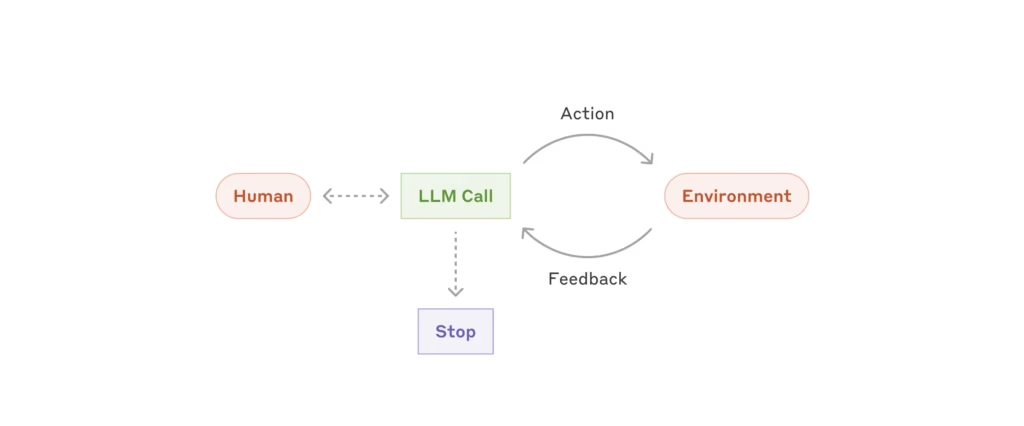
Examples are coding agents and computer use.
It doesn’t go much deeper than this — it is a conceptual article. I think I could learn a lot by looking how specific agents such as OpenCode work, which would be interesting to know.
When implementing agents, we try to follow three core principles:
- Maintain simplicity in your agent’s design.
- Prioritize transparency by explicitly showing the agent’s planning steps.
- Carefully craft your agent-computer interface (ACI) through thorough tool documentation and testing.
Appendix items
- Agents in practice — they say why customer support and coding agents are good fits for using agents (I think as opposed to workflows) and I agree with that. Whether customer support agents > humans I am not sure, but I have used good customer support agents before. The Dell one is particularly good as it runs on your computer so knows your setup, can do scans then book support for you, for example.
- Tools — Mentions tool use, in which LLM sends a stop block to invoke tool use. There are some suggestions on tool formats, but I wonder if those are more for the models of the time, or today if you decide to use cheaper models. However, thinking about formatting coming out of tools is good to save context and money.
- Workbench — there is a workbench to test tools — workbench
- Pokayoke — https://en.wikipedia.org/wiki/Poka-yoke, interesting concept: “is any mechanism in a process that helps an equipment operator avoid mistakes and defects by preventing, correcting, or drawing attention to human errors as they occur”
Experiment
My walnut session then advised to do this tutorial https://ampcode.com/notes/how-to-build-an-agent, which is pretty fun and quick to get going on.
Luckily I know Go, although if you don’t, you can have it converted to Python — it might be more educational to do that manually though.
Anyway this takes you through:
- First you build a simple take-turns chatbot. To fix the terminal characters, replace
\\\uwith\uin the listing, and you will have to change the model as the one they specify no longer exists. Other than that it works. - Then you add tool use, they give you a gotcha for fun — they add the tool request without checking the LLM response and using the tool, so it does nothing. Then show you the code to complete this. You now have a bot that can decide to read a file if it wishes to.
What is interesting is the tool use is programmed in so you get a real feel for what is going on, but it is sort of built into Anthropic’s API, so there is some magic there, but I guess that is the way it is when the models are trained on tool use and have magic tokens or whatnot that you don’t get to see. How that works and is trained is something I would like to go deeper into at some point, but not a priority now.
Feature image generation: Nano Banana 2