
This site runs on WordPress on a cheap hosting plan, with W3TotalCache and Cloudflare in front of it to hopefully make it a bit faster. It turns out my quick setup of bundling this all together wasn’t making the site as fast as I assumed. We’ll talk about how I found out and what easy steps made it quite a bit faster, while still using the cache and Cloudflare.
Recently I found I could speed up this site in simple ways—ways that don’t involve writing code. I found this when I was experimenting with a tool called Locust which load tests services. Let’s look into that a bit more.
Locust
Locust is a performance load testing kit, written in Python. It is easy to install and run if you have Python set up (try to have 3.13 if you have a choice to run Locust). Just do this:
python -m venv .venv
source .venv/bin/activate
pip install locust
locust -V
Then create a locustfile.py like this
from locust import HttpUser, task

class HelloWorldUser(HttpUser):
    @task
    def hello_world(self):
        self.client.get("/")
        self.client.get("/images/someimage.jpg")
Then run locust
locustAnd visit http://0.0.0.0:8089/
You will be asked for number of users, ramp up and host. Going with 1, 1 and https://martincapodici.com/, the system will then start polling those endpoints, and reporting stats:
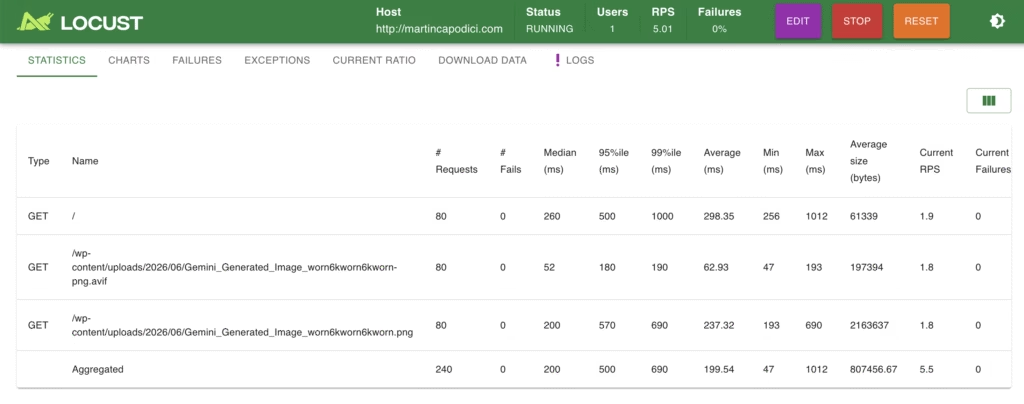
We now have some stats on latency statistics e.g., median latency, 95%ile and 99%ile. If you are not familiar, the 95%ile (or p95) means the latency at which that 95% requests are lower latency (faster), and 5% are higher latency. Higher percentiles like p95 and p99 are useful to get a feel of what the more slow cases are.
The latency includes time to finish the request having downloaded the response body. Therefore, the larger image does take longer, as you would expect. This is heavily influenced by my internet connection. A quick test of which is 91.2 Mbps download / 28.1Mbps upload. Based on that a ~2.16 MB images = 17.28Mb = 189ms to download. By calculating 200-189, we get an inferred ~11ms to process request to the first byte for p50.
The above stats are the optimized versions, and it was worse before, and I’ll go into how bad and what the those optimizations are.
Before we do that notice the GET / is a lot slower, 290ms. That is because the images are behind a CDN, whereas I chose not to cache the HTML on the CDN yet. This means it crosses from somewhere in the US to where I am, adding a lot of network latency. Adding HTML to the CDN is doable, but needs a bit of configuration to avoid the cache interfering with admin/login, and for a low traffic blog this latency for the HTML part of the request is OK for now.
What is a CDN? A CDN solves the latency problem by caching copies of the file in servers in hundreds of cities. The network latency you local city can be as low as 1ms so it makes a huge difference. This is done using things like GeoDNS, Anycast IP Routing, and more.
Things that were slow
On the earlier runs of Locust, latency of the HTML home page / was much higher, I think around 2 seconds p95!
Next, there was only the PNG image and not the more highly compressed AVIF format, and you can see the difference between those two in the test results from before.
Finally, in addition to Locust I ran Google Lighthouse to look for slowness. It found a redundant JS download, and removing this saved about 800kb uncompressed / 200kb compressed. It was a math formula (TeX) renderer bundled with the theme, that I do not need.
Why the slow home page?
The reason for that 2 second latency was a simple lack of caching in WordPress itself. First I had an old cache plugin-in that broke the current one as it didn’t properly get uninstalled. Then on top of that W3TotalCache requires you to opt in to page caching.
Claude helped me diagnose this, which it did really well with just curl commands. Because of this it also noticed the header specifying a 7-day limit for caching, i.e., max-age=604800, which could lead to some people seeing old versions of the home page without the latest post. It was fixed by changing the .htaccess file to reduce the default to 0.
With the page now actually cached, the latency dropped from 2 seconds to the current 500ms p95 — with even better results if you are browsing from the US as much of that latency is the network.
The AVIF improvement?
AVIF is a recent file format which has gained widespread adoption. It is based on the AV1 video format. There are two parts to serving these, one is to have them ready to serve, and the other is to detect if the browser can support them and decide whether to server the older format or AVIF.
To do this without paying for a dedicated service required a couple of plugins, Modern Image Formats (by WordPress Team) and Regenerate Thumbnails. The former will generate the WebP and AVIF files for each image, and serve them when supported, and the latter lets you do the one-off conversion if you haven’t been generating them before.
These speed-ups are great, better for user experience, better for slower connections, better for the environment too!
Image by PublicDomainPictures from Pixabay