
Detour — Prompt Caching
This was an impromptu find. I came across https://kreidemann.com/blog/prompt-caching, it is mostly about prompt caching security and timing attacks, but it does introduce the concept of KV cache well and highlights this can be the system prompt shared by all users, or system + messages making your next turns faster and cheaper (for someone) as they hit the cache. This image is pretty good:
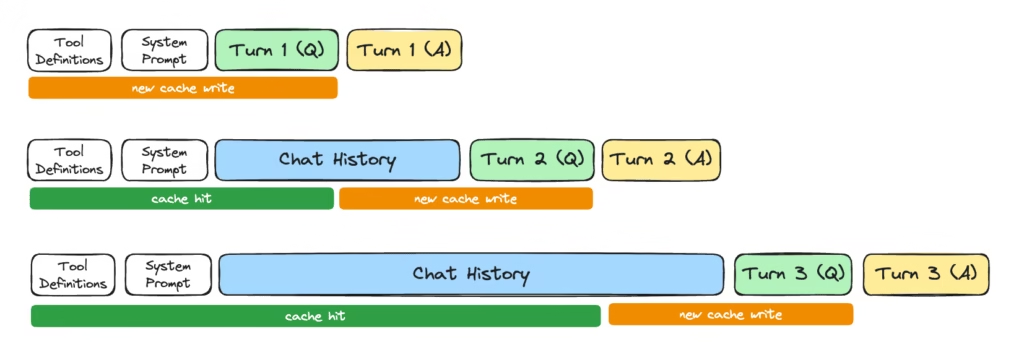
This rabbit hole links to https://sankalp.bearblog.dev/how-prompt-caching-works/ and https://ngrok.com/blog/prompt-caching. I read just the second one for now, and it is excellent. Fairly intense, as it explains attention from mostly from scratch, to the extent it helps explain the KV-cache. I don’t think we probably need to understand all that and the simplified version above is enough intuition to understand the cache. Basically as you run through each token from start to finish you do a calculation. Each calculation depends on the previous. Each token builds upon the last. Therefore, you can cache intermediate calculations. It is kind of like memoization it seems.
My takeaways:
- Reminder — there is a cache!
- It saves someone money, either it is you the consumer, or the model provider if you are paying a fixed monthly amount, or paying the same per token regardless of caching.
- It works well with system prompt, as everyone gets the same one. There is a huge efficiency boost, plus no security worries.
- It also works well with your sessions/prompts, but if sharing these caches across tenants, they may need to be wary of timing attacks.
Original Destination — How Does That Agent Work?
Following on from Weekly AI Learnings #1, I wanted to study how a real life agent works. The agents I am interested in are OpenCode and Pi, and I don’t fully understand how they compare/contrast yet. I have briefly used OpenCode but not Pi.
I have chosen Pi to look at first, mainly because I stumbled across agent-loop.ts, and thought this looks fairly straightforward to read. Maybe OpenCode has such a file, but didn’t find it yet.
I feel like I need to understand a few basics of this code, so git clone https://github.com/earendil-works/pi/ it is.
EventStream (packages/ai/src/utils/event-stream.ts) looks a lot like a Goroutine channel. It has a push, which will send “events” to a listener. A listener which subscribes via an iterator. If there is nothing being pulled, events get queued up. And if there are no events, pulls get queued up and wait for them. There is also a mechanism to close the stream, with a judge function that determines if an event is terminating, along with another function that produces a final result from that closing event. This seems like a useful building block object to have in an agentic system.
Knowing what EventStream is helps me understand agentLoop, which returns said stream, using type AgentEvent for the event, and AgentMessage[] for the result. Agent Events are looking like “stuff the agent does” such as messages and tool calls. This looks neatly organized so far:
export type AgentEvent =
	// Agent lifecycle
	| { type: "agent_start" }
	| { type: "agent_end"; messages: AgentMessage[] }
	// Turn lifecycle - a turn is one assistant response + any tool calls/results
	| { type: "turn_start" }
	| { type: "turn_end"; message: AgentMessage; toolResults: ToolResultMessage[] }
	// Message lifecycle - emitted for user, assistant, and toolResult messages
	| { type: "message_start"; message: AgentMessage }
	// Only emitted for assistant messages during streaming
	| { type: "message_update"; message: AgentMessage; assistantMessageEvent: AssistantMessageEvent }
	| { type: "message_end"; message: AgentMessage }
	// Tool execution lifecycle
	| { type: "tool_execution_start"; toolCallId: string; toolName: string; args: any }
	| { type: "tool_execution_update"; toolCallId: string; toolName: string; args: any; partialResult: any }
	| { type: "tool_execution_end"; toolCallId: string; toolName: string; result: any; isError: boolean };
The EventStream constructed is one that looks for agent_end as the stop signal, and when that happens the results are its messages. At this point I have no idea how this hangs together, but I guess there is some accumulation of messages going on somewhere.
Honestly I have looked ahead at more of the code, and it seems hairy, while also being compact and clever. It’ll be fun reading it all and seeing how it works. I was naively hoping to understand the whole thing in one go, but I’ll wait for next week’s post to go deeper into it.
Image by Zerro Energy from Pixabay