Hermes — I found using Hermes to try to orchestrate work a bit tricky, especially around getting containers to work correctly, i.e. I got errors about not being able to start the container once I moved beyond a single profile.
This could be a skill issue of course, but this coupled with not being able to use the Claude subscription made me move on. I will file Hermes as a useful too for other things — I can imagine it is great for stuff where you want to chat remotely to it from anywhere at any time, and you want it to build memory.
Pi.dev — brief go at this, but not too long. I figured this would be good if I need a coding agent I can hack, but for now Claude Code is fine for my usages as a unit of doing work.
Kanban plugin — here I am using Claude Code and trying to get a simple local kanban flow going. This works quite well and I recommend trying it!
claude plugn marketplace add motlin/claude-code-plugins
claude plugin install markdown-tasks@motlin-claude-code-plugins
Sandcastle — sandcastle lets you run agents in containers and orchestrate them with Typescript. I made a video with more details of what I set up:
Hackathon — at work we did a one-day hackathon, and we used Rovo Studio, Rovo CLI and Rovo Agent to build Confluence apps. I also used an internal tool that does multi-agent orchestration and links to Bitbucket and Jira and that works really well. I might do some videos on future on Rovo and Forge stuff as it is an interesting angle for work where you are probably using Jira already.
✏️ No AI writing is used on this blog, despite what the em-dashes might suggest!
Time for some more “weekly” learnings! Although it has been 19 days. This week I have been looking to discover how people get towards “Level 4” in Boris Cherny’s steps of AI adoption.
I scrolled through YouTube for the first video that seemed like they were showing me their setup rather than trying to teach me a course. I found this video by Tonbi’s AI Garage, and they showed a flow where it went hunting for product feedback and bugs, ranked and deduped them, created tickets on a Kanban board, got human approval via a messaging app and then if approved went ahead and implemented them. This sounded like the level of sophistication and automation I am craving.
The basic secret here is just “use Hermes”. What I mean is that Hermes (an AI agent, somewhat like OpenClaw) has all the tooling built in for what was done in the video which is really cool. Tonbi has done a lot of work to set up that flow on top of what Hermes provides, however it was well within the spirit of how Hermes operates.
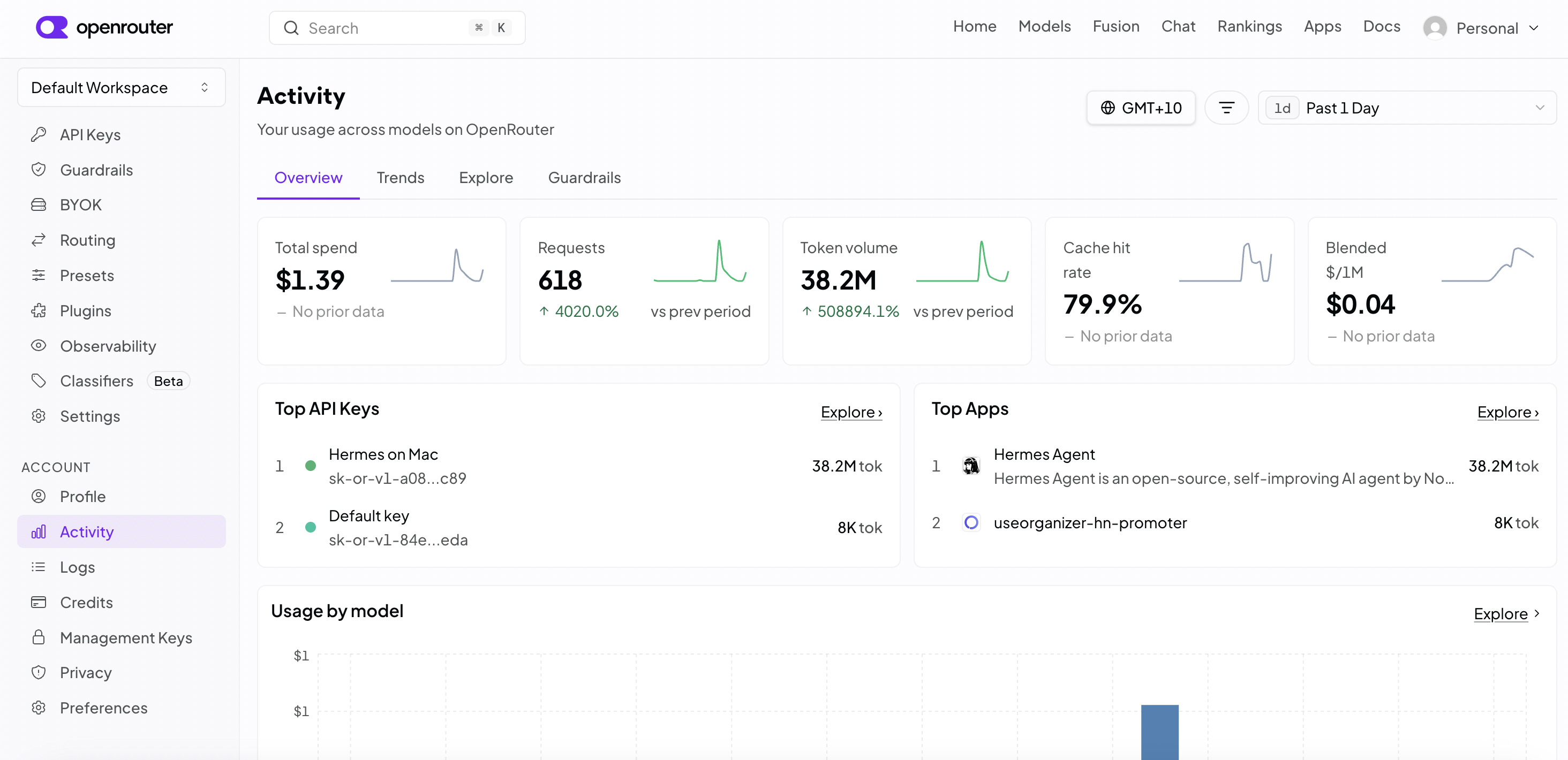
For my experiment I wanted to something 10x simpler that to get oriented. I put some money in OpenRouter as you can’t use a Claude subscription with this tool. I picked deepseek-v4-flash as the model, mainly because it was cheap so my $20 would go far (and didn’t mind it being a bit crappy).
That said I found that the model is pretty decent and honestly for simple coding it doesn’t seem much different to using Claude Code. I did a decent amount of play today for just US$1.39:
What I like about Hermes is it is very easy to install, and intuitive to use. I recommend the setup with options rather than automated. I chose mostly defaults anyway, but with OpenRouter and the model I mentioned before, and I added Signal integration, so I can chat to it from my phone.
For my main chat interactions and configuration, I opted for the web interface, which if you launch like this you can then connect a Cloudflare tunnel to access it from another computer, do these 2 commands in 2 separate terminals. The first one will ask you to set up auth of some sort e.g., username/password.
This gives me 2 ways to interact, the web-UI and signal chat. I found it cool at first to use signal, really cool. Chatting to an app and things getting done on a computer in the other room. However once the initial novelty wore off, there were problems.
It only has one agent chat on the other end, so if it polls for updates for another task, it becomes unresponsive. This could probably be fixed somehow though, please comment if you have suggestions. In the web-UI this is not an issue you can start another chat.
I created a task to add Personal Web App PWA support for my open source project http://useorganizer.com/. PWA is like a webpage you can install to your phone as a homepage app. It did a great job of that. The only odd thing is it decided to just make code changes and not commit, so I edited the SOUL.md file of the coding profile.
What does all this mean? SOUL.md is just instructions for a profile, and a profile lets you have agents with different skills and instructions for different jobs. By having a coding profile I could then create a Kanban ticket for the job, and then the system picks this up and does the work and moves it to done when done.
I just wanted to get a basic feel for this with one task, but in theory you can have dozens of tasks flowing through this. You can have child and parent dependencies and the scheduler will figure out what can be done next. This would seem to allow a lot of opportunity for tuning your flow and steps, and that is what was done in the video above.
My next step was to make it easier to get a task up. I don’t want to use the UI, I want to have a chat about requirements to the agent and then have it create the task, so I set up a profile, with this soul.md. I spent about 20 seconds on this:
{default SOUL.md stuff...}

You will help the user create a Kanban task that has sufficient information to be successful. The process is to ask them what they want, ask follow-up questions to get full picture, then once ready create the Kanban task assigned to a profile ready to pick up.

use the plan skill
I used this new profile with a new chat session to create a task to change how data is stored in the organizer. For this task I want storage to be simpler and work better on Android without keeping asking for permissions. I wanted to achieve this by using It asked a bunch of clarification question as I expected it to, for example how to handle data migration, what to do on Firefox and so on. Here was my prompt:
I want to change how the storage is done on this app, so that we use the system where the app gets allocated a folder (not sure the technical name) rather than picking a folder, so that on android we don't need to keep repicking each time we use the app. I also want to explore if we need to keep local storage support of if that folder option alone is enough which gives simplicity (no choice to make)
This is something before I would have done in Claude Code and babysat it, but now I am writing this post as that runs, which is closer to what I want to get to, i.e., agents doing stuff while I do other stuff, or set up more agents.
I’m glad I used Hermes and tried it out. People debate if it should be used for coding. I think it absolutely can be. It uses git worktrees, so it is fine: if required I can just jump into the folder and launch VSCode. I’ll be using it for coding as my main driver for now, and see if I can change my perspective of the level I work at, stepping back from turn-based coding to something closer to orchestration of agents.
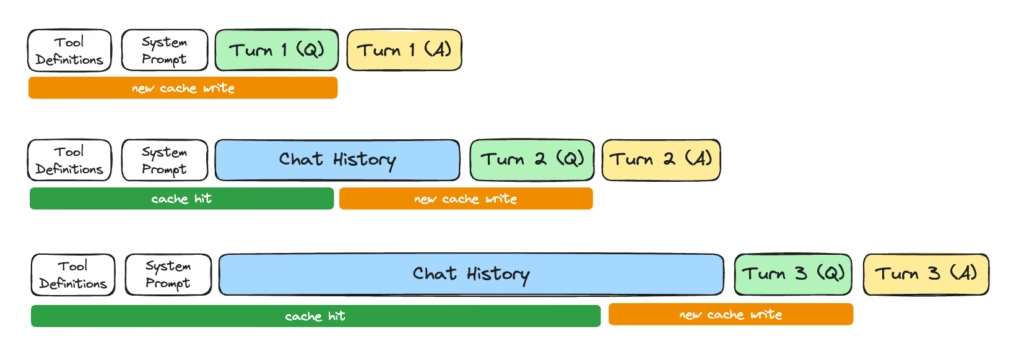
This was an impromptu find. I came across https://kreidemann.com/blog/prompt-caching, it is mostly about prompt caching security and timing attacks, but it does introduce the concept of KV cache well and highlights this can be the system prompt shared by all users, or system + messages making your next turns faster and cheaper (for someone) as they hit the cache. This image is pretty good:
This rabbit hole links to https://sankalp.bearblog.dev/how-prompt-caching-works/ and https://ngrok.com/blog/prompt-caching. I read just the second one for now, and it is excellent. Fairly intense, as it explains attention from mostly from scratch, to the extent it helps explain the KV-cache. I don’t think we probably need to understand all that and the simplified version above is enough intuition to understand the cache. Basically as you run through each token from start to finish you do a calculation. Each calculation depends on the previous. Each token builds upon the last. Therefore, you can cache intermediate calculations. It is kind of like memoization it seems.
My takeaways:
Reminder — there is a cache!
It saves someone money, either it is you the consumer, or the model provider if you are paying a fixed monthly amount, or paying the same per token regardless of caching.
It works well with system prompt, as everyone gets the same one. There is a huge efficiency boost, plus no security worries.
It also works well with your sessions/prompts, but if sharing these caches across tenants, they may need to be wary of timing attacks.
Original Destination — How Does That Agent Work?
Following on from Weekly AI Learnings #1, I wanted to study how a real life agent works. The agents I am interested in are OpenCode and Pi, and I don’t fully understand how they compare/contrast yet. I have briefly used OpenCode but not Pi.
I have chosen Pi to look at first, mainly because I stumbled across agent-loop.ts, and thought this looks fairly straightforward to read. Maybe OpenCode has such a file, but didn’t find it yet.
I feel like I need to understand a few basics of this code, so git clone https://github.com/earendil-works/pi/ it is.
EventStream (packages/ai/src/utils/event-stream.ts) looks a lot like a Goroutine channel. It has a push, which will send “events” to a listener. A listener which subscribes via an iterator. If there is nothing being pulled, events get queued up. And if there are no events, pulls get queued up and wait for them. There is also a mechanism to close the stream, with a judge function that determines if an event is terminating, along with another function that produces a final result from that closing event. This seems like a useful building block object to have in an agentic system.
Knowing what EventStream is helps me understand agentLoop, which returns said stream, using type AgentEvent for the event, and AgentMessage[] for the result. Agent Events are looking like “stuff the agent does” such as messages and tool calls. This looks neatly organized so far:
The EventStream constructed is one that looks for agent_end as the stop signal, and when that happens the results are its messages. At this point I have no idea how this hangs together, but I guess there is some accumulation of messages going on somewhere.
Honestly I have looked ahead at more of the code, and it seems hairy, while also being compact and clever. It’ll be fun reading it all and seeing how it works. I was naively hoping to understand the whole thing in one go, but I’ll wait for next week’s post to go deeper into it.
This is a series where I talk about trying to learn more about AI tools, with the goal of learning practical skills to solve problems both in life and at work.
Current State
I know basically how LLMs work e.g., by doing the zero-hero course a while back, and I use AI almost exclusively for writing code at work using Rovo, and now looking at how do I effectively “harness” things to get the best results, waste less time, avoid tech debt and so on.
I am also interested in automated agents and how they can be useful, how to avoid slop from whatever source wasting human time, and when—like I am now for writing this post—not to use AI at all.
This week
This week I started with Building effective agents, which is a 2024 Anthropic article. I have a walnut set up on my personal context manager that I am using to guide me about what to learn, and it suggested this. I questioned it that it is from 2024, which is a bit old in this fast moving world, and Claude said something along the lines of:
Why it ages well: it was written at the concept level, not the tooling level. It covers workflow vs. agent distinction, five patterns and core advice.
So I gave it a read. My notes are below.
Building Effective Agents: My Notes
It starts of defining words—a very useful thing to do for common understanding. I have pasted below from the article:
Workflows are systems where LLMs and tools are orchestrated through predefined code paths.
Agents, on the other hand, are systems where LLMs dynamically direct their own processes and tool usage, maintaining control over how they accomplish tasks.
Here are the advantages of each:
Agents
Workflows
+ Task Performance + Difficult and open-ended problems
— Potential for compounding errors
+ Lower Latency + Lower Cost + Predictability and Consistency
I learned of existence of the agent SDK, which “includes built-in tools for reading files, running commands, and editing code, so your agent can start working immediately without you implementing tool execution.” It also plugs a couple of GUI tools: Rivet and Vellum.
Rivet and Vellum look very useful and polished, and that makes me wonder how they compare to the OpenClaw and Hermes hype of 2026.
In any case, Anthropic recommend developers use API directly, I guess for the obvious reasons (I won’t spell it out, but you know if you have been writing code for some time). Nonetheless, those tools look fun to play with.
It defines augmentations and the diagram mentions query/results, call/response and memory. One of the talks at this meetup mentioned the analogy here with your operating system, something like LLM is compute, memory is RAM, MCP is calling out to the internet maybe, stuff like that.
Then these workflow concepts:
Prompt Chaining — What it says on the tin I guess. Do one prompt, then do another. Perhaps with a gate between. Means the LLM can dedicate more attention to each task (my view). Tradeoff is better performance at task, for higher latency and maybe cost overall.
Routing — You can route to the right LLM. Possibly the best LLM for the job, or maybe the most cost-effective. It doesn’t mention how to route, but I imagine this could be anything from simple pattern matching/regex to using a classifier, to asking a cheap model to classify, or even asking the human. My guesses.
Parallelization — obvious use case is for speed, you have things that can be done at the same time. Also, good for sectioning I guess a bit like chaining above to focus more attention on two aspects of the same problem. There is also voting, e.g., approach the same issue from different angles then combine (their example is look for vulns). I also think this is where you could send to OpenAI and Claude and compare what they say, although this article ain’t going to say that of course!
Orchestrator — Workers — I just see this as dynamic parallelization with an LLM in charge. This is the classic thing Claude Code does all the time.
Evaluator — Optimizer — LLM evaluates result from another LLM. A loop to repeat until the evaluator is happy.
Agent concepts:
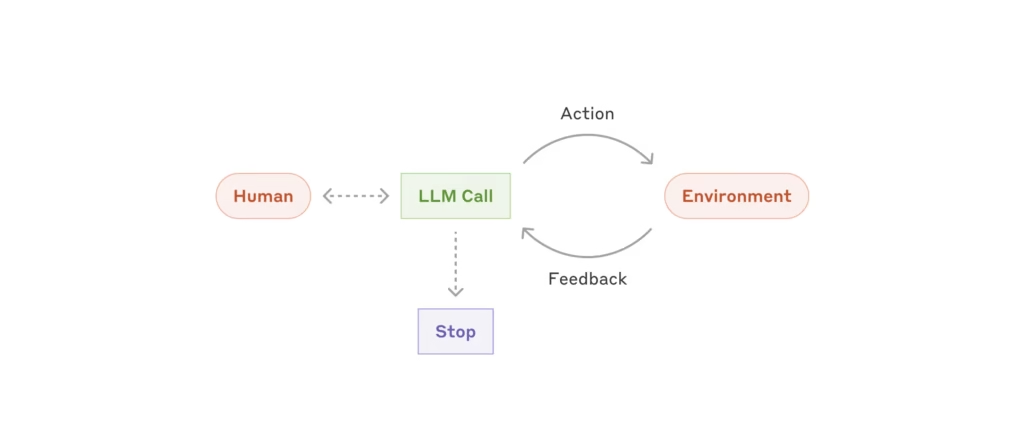
There are many fantastic diagrams in the article, but the one I will copy is this about Agent loops, saying how simple they are at the core:
Examples are coding agents and computer use.
It doesn’t go much deeper than this — it is a conceptual article. I think I could learn a lot by looking how specific agents such as OpenCode work, which would be interesting to know.
When implementing agents, we try to follow three core principles:
Maintain simplicity in your agent’s design.
Prioritize transparency by explicitly showing the agent’s planning steps.
Carefully craft your agent-computer interface (ACI) through thorough tool documentation and testing.
Appendix items
Agents in practice — they say why customer support and coding agents are good fits for using agents (I think as opposed to workflows) and I agree with that. Whether customer support agents > humans I am not sure, but I have used good customer support agents before. The Dell one is particularly good as it runs on your computer so knows your setup, can do scans then book support for you, for example.
Tools — Mentions tool use, in which LLM sends a stop block to invoke tool use. There are some suggestions on tool formats, but I wonder if those are more for the models of the time, or today if you decide to use cheaper models. However, thinking about formatting coming out of tools is good to save context and money.
Workbench — there is a workbench to test tools — workbench
Pokayoke — https://en.wikipedia.org/wiki/Poka-yoke, interesting concept: “is any mechanism in a process that helps an equipment operator avoid mistakes and defects by preventing, correcting, or drawing attention to human errors as they occur”
Luckily I know Go, although if you don’t, you can have it converted to Python — it might be more educational to do that manually though.
Anyway this takes you through:
First you build a simple take-turns chatbot. To fix the terminal characters, replace \\\u with \u in the listing, and you will have to change the model as the one they specify no longer exists. Other than that it works.
Then you add tool use, they give you a gotcha for fun — they add the tool request without checking the LLM response and using the tool, so it does nothing. Then show you the code to complete this. You now have a bot that can decide to read a file if it wishes to.
What is interesting is the tool use is programmed in so you get a real feel for what is going on, but it is sort of built into Anthropic’s API, so there is some magic there, but I guess that is the way it is when the models are trained on tool use and have magic tokens or whatnot that you don’t get to see. How that works and is trained is something I would like to go deeper into at some point, but not a priority now.